Understanding Coaxial Cables in Audio Systems
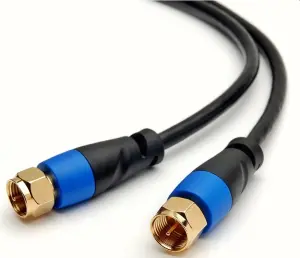
In the world of high-fidelity audio, confusion often arises regarding cabling standards. You may have seen the term coaxial cable used in discussions about speaker connections. It is vital to clarify a technical reality: standard coaxial cables—the ones with an inner conductor, dielectric, shield, and jacket—are designed for Radio Frequency (RF) signals, not for the high-current power required by passive speakers.
Using a standard coaxial cable (like RG-6) to connect an amplifier to a speaker is a technical mismatch. While these cables excel at carrying digital signals or antenna feeds, they are not optimized for the low-impedance, high-current flow that speakers demand. If your setup requires a coaxial-style connection, it is likely for digital audio transport (S/PDIF) rather than the physical speaker level signal.
The Core Difference: RF vs. Speaker Level Signals
Think of your audio system like a plumbing network. A coaxial cable is like a thin, high-pressure pipe designed for specific data streams. A speaker cable is like a wide, industrial conduit designed to handle massive volume. Connecting an amplifier to a passive speaker requires thick, low-resistance copper wire to ensure the energy reaches the driver without heat loss or signal degradation.
If you encounter a cable labeled as a speaker cable that looks like a coax, it is likely a specialized design featuring two conductors under a shield. However, in 99% of home audio setups, you should rely on high-purity oxygen-free copper (OFC) speaker wire. This wire provides the surface area necessary to manage the varying impedance of your speakers effectively.
Choosing the Right Connection for Your System

When you are setting up your gear, avoid the temptation to repurpose cables intended for television or digital signals. Here is how to select the right path for your specific audio needs:
- For Digital Audio: Use a true 75-ohm coaxial cable. This is ideal for connecting a CD transport to a DAC, as it maintains the impedance required to prevent signal reflections that cause jitter.
- For Passive Speakers: Use standard, high-quality multi-strand speaker wire. Aim for 14 or 16 AWG (American Wire Gauge). The lower the number, the thicker the cable, which is critical for runs longer than 15 feet.
- For Active/Powered Speakers: These systems often use XLR or RCA interconnects. These cables carry low-voltage signals that are entirely different from the amplified signal sent to passive speakers.
Avoiding Common Installation Pitfalls
Many beginners attempt to use coaxial cables for speakers because of their shielding. While shielding is great for preventing noise in low-level signals, it is largely unnecessary for speaker-level signals, which are high-voltage enough to overcome most ambient electromagnetic interference. Using the wrong cable leads to several preventable issues:
- Increased Impedance: Thin cables act like a bottleneck, restricting the amplifier’s ability to control the speaker’s woofer.
- Signal Attenuation: You may notice a loss of bass response or a lack of detail in the high frequencies if the cable resistance is too high.
- Connector Mismatch: Attempting to terminate a coaxial cable for standard spring clips or binding posts is tedious and often results in a poor physical connection.
Professional Tips for Audio Cabling
To maximize your sound quality, focus on the integrity of the connection rather than exotic cable materials. Your biggest gains will come from removing oxidation and ensuring a tight, clean contact point.
- Check your terminations: Whether using bare wire, banana plugs, or spades, ensure the metal surfaces are clean and free of corrosion.
- Maintain channel consistency: Always use the same length and type of cable for both the left and right speakers. This ensures the resistance and capacitance are identical for both sides of your stereo image.
- Avoid sharp bends: Even if you are using digital coaxial cables, avoid kinking them. Tight bends can alter the internal geometry of the cable, potentially damaging the impedance match.
- Keep power and signal cables separate: To prevent hum, keep your signal cables physically separated from your AC power cords by at least a few inches.
Conclusion
Do not be swayed by marketing jargon that confuses RF coaxial standards with speaker-level performance requirements. Prioritize thick, reliable copper wire for your speakers and dedicated 75-ohm coaxial cables for your digital component links. By matching the cable type to the specific task, you ensure your equipment operates within its intended specifications, delivering the accuracy and power your audio system is capable of producing.
Contenu mis a jour le 2026-08-22