Can you use Oculus with PS5?
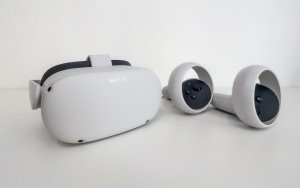
The short answer is no. You cannot connect a Meta Quest 2, Quest 3, or Quest Pro to a PlayStation 5 to play VR games. If you see tutorials online claiming this is possible, they are misleading. There is no native support, no hidden USB handshake, and no software update that enables this connection.
The Hardware Language Barrier
To understand why this is impossible, think of the PS5 and your Quest as two people speaking different languages. Your PS5 operates on a proprietary system built exclusively for the PlayStation VR2 (PS VR2). The Meta Quest runs on a modified Android architecture.
A USB-C cable is merely a physical pipe. It can transport electricity or data, but without a translator—known as a driver—the console remains blind to the headset. The PS5 is hard-coded to ignore any hardware that does not possess the specific cryptographic handshake issued by Sony. Without that digital key, the door remains locked.
Why Ecosystems Remain Closed
Sony manages the PS5 like a high-security facility. Only authorized equipment is granted entry to the system’s processing power. This strategy ensures a consistent performance level, but it also creates the wall you are currently facing.
When you plug a Quest into a PS5, the console detects a power draw. It will charge the headset, but it will never mount it as a display device. There are no middleware drivers, and Sony has no incentive to build support for a direct competitor’s hardware. Attempting to bridge this gap via unauthorized hardware adapters is a waste of money; these devices will simply fail to establish a video signal.
The Reality of Remote Play Workarounds
Some users attempt to use PS Remote Play to bridge the gap. They stream the PS5 output to a PC, then view that desktop window inside their Quest via apps like Virtual Desktop. While this technically puts the image in your headset, it is not VR.
You are simply looking at a giant, flat 2D screen inside a virtual room. This setup is plagued by two major issues:
- Input Lag: The signal travel time from the PS5 to the PC and then to your headset creates a perceptible delay.
- Motion Sickness: In VR, even a millisecond of latency between your head movement and the visual response causes instant nausea.
Common Pitfalls and Misconceptions
Avoid falling for these common traps often shared in online forums:
- The USB Data Myth: Plugging a high-speed data cable into the PS5 port does not enable game streaming. It serves only as a power source.
- Software Modding: You cannot sideload software onto the PS5 to trick it into recognizing the Quest. The console OS is locked down tightly.
- Controller Incompatibility: Quest Touch controllers are not recognized by the PS5 Bluetooth stack. They will not function in the console menus.
Field Advice: Where to Invest Your Time
If your goal is high-quality VR, you have to choose your ecosystem. The PS5 is designed to be a plug-and-play experience. The PS VR2 is the only headset that utilizes the console’s full potential, including foveated rendering and haptic feedback. These features are baked into the hardware architecture.
If you prefer the flexibility of the Meta Quest, your best path is PCVR. By connecting your Quest to a capable gaming PC, you access a much larger library of titles than the PS5 can currently offer. You gain access to SteamVR and the Meta Store simultaneously.
Final Recommendation
Stop searching for a way to force a connection between a Quest and a PS5. It does not exist, and no amount of technical tweaking will change the underlying firmware of the console. Focus your budget on the platform that aligns with the games you actually want to play.
If you already own a PS5, start saving for a PS VR2 to enjoy a seamless, high-performance experience. If you love your Meta headset, invest in a better PC or a dedicated router to improve your wireless PCVR setup. Mixing these two distinct hardware worlds is a guaranteed path to technical frustration.
Contenu mis a jour le 2026-08-22