Can you cut LED lights?
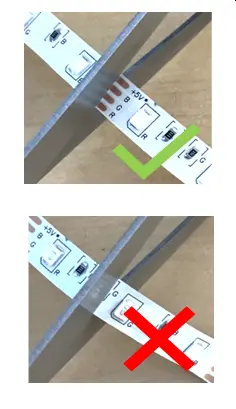
Yes, you can cut most LED strip lights. However, doing so requires precision. Think of an LED strip like a series of identical train cars linked together. If you cut between the cars at the designated coupling point, everything stays functional. If you cut through the middle of a car, the entire system breaks down.
Understanding how your specific strip is built is vital. You must consider voltage, current flow, and the physical constraints of the circuit board.
The importance of voltage: 12V vs 24V
Not all strips are built the same. The voltage rating determines how frequently you can cut the strip. A 12V strip usually has cut points every 3 LEDs, while a 24V strip often has cut points every 6 or 7 LEDs.
Higher voltage (24V) allows for longer runs without brightness drop-off. The cut interval is longer because the internal circuit design requires more LEDs in a series to handle the voltage. Always check your strip markings before you reach for the scissors. If you attempt to cut a 24V strip at a 12V interval, you will sever the circuit and leave a portion of the strip dead.
Identifying the cut points
Before you make a cut, inspect the strip closely. Manufacturers include visual cues that act as a safety map for the circuitry.
- Copper contact pads: These are the metallic rectangles on the strip. They serve as the solder points for power or connectors.
- Scissor icons: Look for the small icon printed on the PCB. It indicates the exact center point for your cut.
- Circuit traces: If you see thin lines running through the copper, that is your target. Cutting anywhere else severs the connection to the next segment.
If your strip is encased in a thick silicone sleeve, you must be extra careful. Use a precision hobby knife to expose the copper pads before cutting the flexible board underneath.
How to execute a clean cut
Preparation prevents failure. Never cut an LED strip while it is connected to a power supply. You risk a short circuit that can fry the onboard resistors.
- Measure your mounting surface first. It is always better to cut a little bit less and trim again than to cut too short.
- Use sharp, heavy-duty household scissors. Dull blades crush the delicate components rather than slicing them.
- Align your blade exactly in the middle of the copper pads. This leaves half of the contact pad on each side, providing enough space for a future connection.
- Ensure the cut is perfectly perpendicular. A jagged or angled cut can make it impossible for solderless connectors to grip both sides of the circuit effectively.
Common mistakes to avoid
Even small errors during the cutting process can lead to long-term headaches. Avoid these pitfalls to maintain a professional setup.
- Cutting too close to an LED: This destroys the resistor path. Without a functioning resistor, the excess current will cause the remaining LEDs in that segment to burn out almost instantly.
- Crushing the PCB: Applying too much force with dull scissors can delaminate the copper traces from the board. This creates intermittent contact and annoying flickering.
- Neglecting waterproof seals: If you cut an IP65 or IP67 rated strip, you have effectively opened a door for humidity. Always seal the exposed end with silicone end caps and a dab of clear silicone sealant.
Field tips for wiring your cut segments
Once you cut a strip, the remaining piece has no way to draw power unless you reconnect it. You have two primary methods to bridge the gap.
Solderless connectors are the most efficient option for beginners. These plastic clips feature small teeth that pierce the protective coating and bite into the copper pads. They snap shut to create a reliable connection without the need for a soldering iron.
If you prefer a permanent, low-profile connection, use soldering. Apply a tiny amount of solder to the copper pads on the strip and the wire. Gently join them with a soldering iron. This creates a much stronger electrical bridge than any plastic clip can provide.
Always test your segments before securing them permanently. Connect the cut piece to your power supply to ensure full illumination. If the strip does not light up, check for a loose connection at the copper contact or verify that your polarity (positive to positive, negative to negative) is correct.
Content updated on 2026-10-18