How to use a motorbike GPS system effectively?

Using a motorbike GPS is fundamentally different from using a smartphone app tucked in your pocket. A dedicated motorcycle unit acts like a specialized co-pilot. It manages vibration, weather, and ergonomics specifically for the demands of two wheels. If you simply mount it and hit ‘start,’ you are barely using 20% of its capabilities.
Mastering Hardware Positioning for Safety
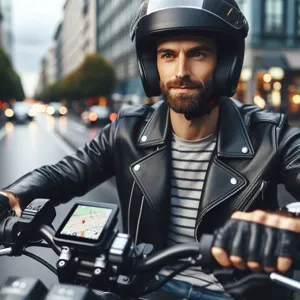
Your GPS mounting point dictates your safety. If the screen sits too low, your eyes spend more time off the road than on it. Think of this like your dashboard instruments: they should stay within your peripheral vision so you never have to tilt your head down to check a turn.
For optimal stability, mount the unit near your handlebar clamps or on a cockpit rail. Use vibration-dampening mounts, especially if you ride a large-displacement twin-cylinder engine. These engines produce low-frequency pulses that can literally shake the internal electronic components of a GPS to failure over time.
- Use a rigid, metal-bracket mount rather than plastic suction cups.
- Install a locking mechanism or security tether to deter theft during gas station stops.
- Hardwire the device directly to your bike’s switched power supply to avoid intermittent USB failures caused by micro-vibrations.
The Art of Route Curation
Most riders make the mistake of setting a single destination and letting the GPS dictate the path. This usually leads to the most direct, boring highway route. To get the best ride, you must use shaping points.
Think of shaping points like waypoints on a treasure map. By forcing the GPS through specific mountain passes or winding backroads, you override the device’s default ‘fastest path’ logic. Use desktop software or web-based planners to export GPX files. This ensures your unit sticks to your preferred path regardless of what the automatic re-routing algorithm thinks.
Pro-Tip: If you input only a start and end point, the GPS assumes you are in a rush. Always add at least three mid-route stops to guarantee you stay on the twistiest, most enjoyable roads.
Effective Integration with Intercom Systems

Pairing your GPS with your helmet intercom is critical for focus. Many riders pair both their phone and their GPS to their helmet independently. This creates a conflict where audio channels fight for priority, often cutting out your navigation instructions.
Establish a logical hierarchy. Connect your phone to the GPS first, and then connect the GPS to your helmet. This ‘daisy-chain’ setup allows the GPS unit to act as a traffic controller. It will automatically lower your music volume to deliver clear, precise turn-by-turn audio prompts exactly when you need them.
Avoiding Common Operational Errors
The most dangerous mistake is interacting with the touchscreen while the bike is in motion. Even with ‘glove-friendly’ technology, your cognitive load—the amount of mental effort required to process information—increases significantly while riding. Reading a map while leaning into a corner is a recipe for a target fixation crash.

Follow these rules to maintain control:
- Adjust your route settings and ‘avoidance’ filters while the bike is parked.
- Never attempt to zoom in or drag the map while cornering.
- If you miss a turn, ignore the unit and find a safe spot to pull over. Let the device recalculate while you are stationary.
Maintenance for Long-Term Reliability
Motorbike GPS units face much harsher environments than car-based devices. Dust, bugs, and rain will degrade the screen coating if you do not maintain it. Use only a damp microfiber cloth for cleaning. Never use glass cleaners with ammonia, as these chemicals will dissolve the anti-glare, sunlight-readable finish that makes the screen visible in daylight.
Additionally, treat firmware updates like oil changes. You should check for updates every six months. Software updates often include critical tweaks to how the device handles satellite acquisition, which prevents those annoying ‘frozen screen’ issues in deep canyons or dense forest cover. Keeping your device updated is the best way to prevent a system crash during a long-distance trip.
Real-World Troubleshooting
If your GPS signal drops, do not rely solely on the screen. Many units have a ‘track log’ function. This feature records your actual path independently of the calculated route. If the device freezes, look at the track log to identify your current position relative to the last known point. By understanding these technical nuances, you transition from a casual user to a rider who truly commands their technology.
Content updated on 2026-09-09